
PhotoPills
PhotoPills, SLPhotography
4.8513.00 Reviews
- Version
- 1.8.23
- Installs
- 100.00K
- Age Rating
- Everyone
Screenshots

Our Review of PhotoPills
 Analysis by Appyee
I think the best way to approach PhotoPills is as a planning desk you can carry to a location, not as a camera app that will make decisions for you. It is a paid photography app from PhotoPills, SL, priced at $10.99, and its focus is helping you work out when and where celestial light will appear. That distinction matters: if you mainly want quick edits or a simple camera interface, this is probably not the tool you need. If you enjoy choosing a viewpoint in advance and arriving with a shot in mind, its collection of planning tools can save a lot of uncertainty.
Start with the scene, then build a plan
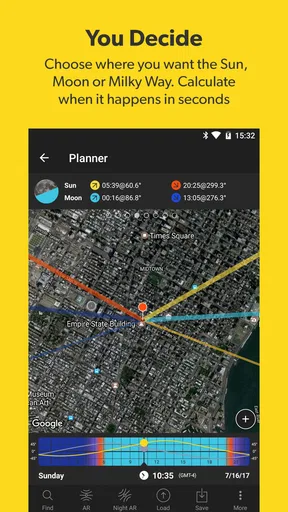
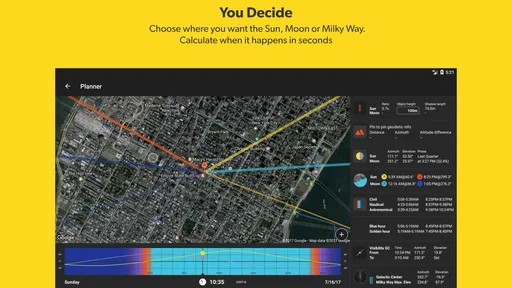
My most useful routine begins with a specific picture rather than with browsing every tool. I choose a location, consider what I want in the foreground, and use the planner to check how the sun or moon will line up with it. For a Milky Way image, I think about the direction I can see from the spot and whether the timing makes sense. This makes the app easier to learn because each screen answers a practical question instead of becoming another feature to memorize.
One detail worth getting right is the difference between a promising forecast and a workable composition. A celestial body can be in the right direction while a hill, building, or restricted viewpoint blocks the frame. I use the map as a planning aid, then treat the actual location as the final test: arrive early enough to check the sightline, adjust the camera position, and leave room for conditions to differ from the plan. The app narrows the search; it cannot guarantee the picture.
Build habits around the settings you use
The calculators become more useful when you know what you are trying to solve. For depth of field or hyperfocal distance, have your camera and lens details to hand and use the result to make a deliberate focus choice. For exposure, start from the conditions you expect, then check the scene through your camera and refine from there. These tools can reduce mental arithmetic, but they do not replace checking focus, exposure, or the changing light on site.
I would also make a short pre-shoot checklist instead of trying to remember every calculator. Before a landscape outing, I might check the planned alignment, the timing, and the exposure approach; for a time-lapse, I would work through the Timelapse Calculator before setting up. This repeatable habit is more valuable than opening every tool on every trip. A carefully chosen workflow keeps the app’s breadth from slowing down a shoot.
Use repeatable shortcuts, not every tool at once
When I am short on time, I focus on one question: what must be true for this shot to work? If it depends on a moon position, I check that first. If the image depends on a sequence of changing light, I plan the time-lapse settings before I arrive. For a scene built around depth, I turn to the relevant calculator rather than working through unrelated menus. Keeping a few familiar routes in mind makes the app feel much faster than exploring it from scratch each time.
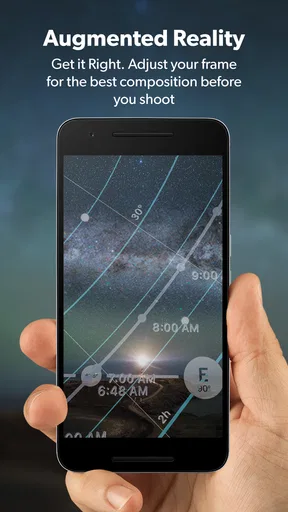
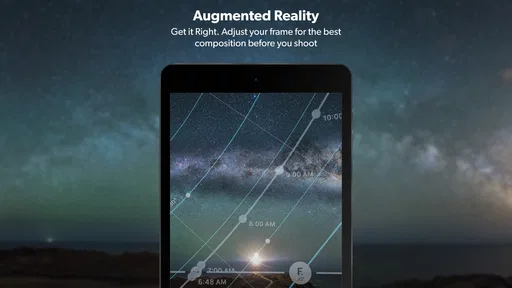
A realistic example is a free evening when the forecast looks promising for a night landscape. I would use the planner at home to decide whether the location and timing are worth the drive, then check the view in the augmented reality display after arriving. If the foreground blocks the alignment, I can move to a nearby viewpoint or change the composition before committing to a long setup. That small decision can be more useful than a technically precise plan that ignores what is actually in front of the lens.
The Magic of PhotoPills Unleashed
When I first opened the app, I was greeted with a sleek interface that's both intuitive and comprehensive. At first, it might seem a bit overwhelming because of the sheer volume of features, but trust me, once you dive in, it gets pretty addictive. The app is available on both Android and iOS, which is a bonus for those who like to switch between devices.
Features That Stand Out
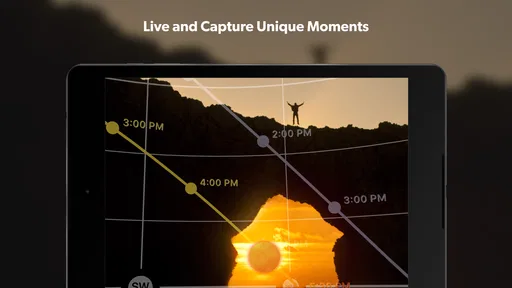
One of the standout features is the planner. It allows you to plan your shots down to the minute, calculating the position of the sun, moon, and even the Milky Way. No more guessing when the golden hour is or when the moon will be perfectly aligned with that awesome mountain peak you want to shoot. The level of detail is incredible, and it’s amazing how accurately it predicts celestial events.
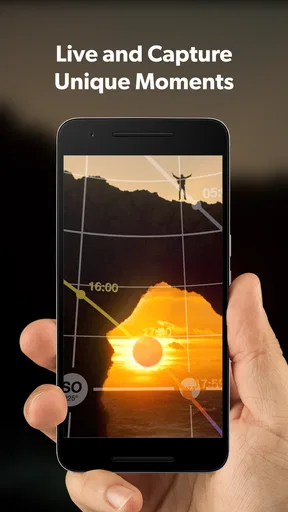
Another feature that caught my attention is the augmented reality view. You can point your phone at the sky and see exactly where the sun, moon, and stars will be at any given time. It's like having a virtual planetarium in your pocket. This feature alone can change the way you plan your night photography sessions.
Tools for Every Scenario
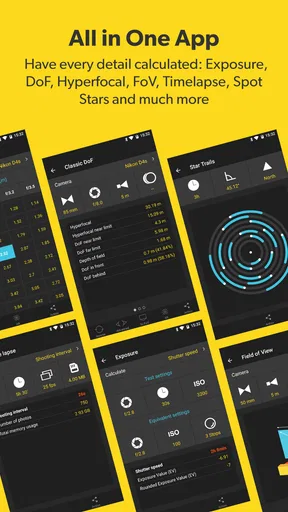
The app also includes a wide range of calculators and tools. From depth of field and hyperfocal distance calculators to exposure calculators, it has everything you need to ensure your photos come out just right. I found the exposure calculator particularly useful when shooting in tricky lighting conditions. It takes the guesswork out of setting up your camera.
If you're into time-lapse photography, the Timelapse Calculator is going to be your best buddy. It helps you determine the ideal settings for capturing stunning time-lapse sequences, which can be a game-changer for landscape photographers.
The Learning Curve
While the app is incredibly powerful, it does come with a bit of a learning curve. There's so much to explore and learn, but thankfully, the developers have thought of that too. The app includes a series of tutorials and user guides that are super helpful. I spent a good amount of time going through these resources, and they made a big difference in understanding how to make the most out of the features.
There’s also a community of users who share tips and tricks, which is great for getting inspiration and learning from others. The app even includes a section for learning from master photographers, which is a nice touch.
Making the Most of It
One of my favorite things about PhotoPills is that it sparks creativity. It encourages you to think about light and composition in new ways. By knowing exactly where and when the light will be perfect, I’ve found myself planning shoots in locations I might not have considered before.
The app isn't just for landscape photographers either. Portrait, street, and even astrophotographers can benefit from its comprehensive toolkit. It’s versatile enough to meet the needs of various photography styles, which I find really impressive.
Where it fits among photography apps
Compared with a basic weather app, a compass, or a single-purpose sun-position tool, this is a more involved choice: its advantage is bringing planning and camera calculations together, while its trade-off is the time needed to learn where each tool fits. A weather forecast can still be the better first stop for deciding whether conditions are suitable, and a camera’s own controls remain the place to make the final exposure. I see PhotoPills as a companion to those tools, not a replacement for them.
It is especially appealing if you plan landscapes, night skies, or time-lapses often enough to benefit from a repeatable process. A casual phone photographer who mainly takes spontaneous snapshots may find the price and depth hard to justify. The same is true if you rarely plan around the sun, moon, or Milky Way; in that case, a simpler free utility may cover the occasional check with less effort.
What the plan cannot decide
The planner can help answer when a celestial alignment is expected, but the creative choices remain yours: whether the foreground is compelling, whether the weather cooperates, and whether the composition works from the place you can actually stand. I would avoid treating a precise time as a promise of ideal light. Use it to choose when to be ready, then watch the scene and adjust. That approach is particularly important for moving clouds, changing visibility, or a location where access limits your options.
There is also a practical learning cost. The range of calculators is a strength once you know your routine, but it can feel like too much if you open the app without a clear question. I recommend learning one workflow at a time—first a sun or moon plan, then the relevant camera calculator—and saving broader exploration for when you are not rushing to set up. The included guides help, but patience still matters.
If you are wondering whether it suits a beginner, I would say yes if you are curious about planning and willing to learn, not simply because you own a camera. You can start with one straightforward goal, such as checking the direction of sunset at a familiar location, and add calculators as your needs grow. If you want an app to choose settings automatically or teach photography from the ground up, this is not the best match; its role is to support decisions, not make them for you.
PhotoPills is rated 4.8 on average from around 8,100 ratings, with about 512 written reviews and over 100,000 installs. It is rated for Everyone, was released on May 26, 2017, and its current version is 1.8.21, with Android 5.0 as the minimum operating system. Those details make it an established option, but the deciding question is still whether you will use its planning depth. I would check that your device meets the requirement and consider how often you shoot scenes where timing and alignment matter before buying.
Concluding Thoughts
In a world where photography is as much about planning as it is about capturing the moment, PhotoPills stands out as an indispensable tool. It’s like having a personal photography assistant right in your pocket. While it might take some time to get used to all the features, the payoff is well worth it. If you're serious about improving your photography skills and planning your shoots with precision, you should definitely give PhotoPills a try. Happy shooting!
Verdict
Strengths of PhotoPills
- Intuitive user interface for easy navigation.
- Comprehensive tutorials for beginners.
- Highly customizable settings for precision.
- Wide range of tools for diverse photography needs.
- Regular updates with new features.
Limitations of PhotoPills
- Steep learning curve for advanced features.
- Some features require in-app purchases.
- Occasional bugs in certain Android versions.
- GPS functionality can drain battery quickly.
- Limited community support for niche issues.
Similar Picks in This Category
View All
Google Photos
Google LLC4.4

Gallery
Google LLC4.2

Picsart AI Photo Editor, Video
PicsArt, Inc.3.9

B612 AI Photo&Video Editor
SNOW Corporation4.1

BeautyPlus-Selfie Photo Editor
PIXOCIAL TECHNOLOGY (SINGAPORE) PTE. LTD.4.5

Remini - AI Photo Enhancer
Bending Spoons4.1
Frequently Asked Questions
What is PhotoPills and who is it for?
PhotoPills is a versatile photography planning app designed for photographers who want to capture the perfect shot. It offers tools for planning and managing shoots, including sun and moon tracking, Milky Way planning, and augmented reality to visualize future shots. Whether you're a professional or an amateur photographer, PhotoPills can enhance your ability to plan and execute stunning photographs.
How user-friendly is PhotoPills for beginners?
PhotoPills has a learning curve, especially for beginners unfamiliar with photography planning tools. However, it provides extensive tutorials, user guides, and a community to help new users get up to speed. With practice, beginners will find the app's interface intuitive and its features invaluable for improving their photography skills.
What platforms is PhotoPills available on?
PhotoPills is available for both Android and iOS devices. It supports a wide range of smartphones and tablets, making it accessible to most users. The app is regularly updated to ensure compatibility with the latest operating systems, so users can enjoy its features without worrying about technical issues.
Does PhotoPills require an internet connection to function?
PhotoPills can function offline for most of its features, making it ideal for remote locations where internet access might be limited. However, certain features, like map updates and location-based services, may require an internet connection. Users can plan ahead by downloading necessary data before heading out to shoot.
Are there any costs associated with using PhotoPills?
PhotoPills is a premium app, which means there is an upfront purchase cost. However, it does not have any recurring subscription fees, making it a one-time investment. The cost is justified by the comprehensive set of features and tools that cater to photographers aiming to elevate their craft.
